Why you should switch off Google ads auto-apply
A few of my clients have been caught out recently by Google automatically making changes in their account.
'How on earth can this happen?!' I hear you ask.
Well, Google make it very easy to opt into this 'auto-apply' feature without necessarily making it clear what will happen.
(And opting out isn't the easiest - we'll come back to that!)
These are the types of emails they send you to encourage you to opt in, which as you can see is fairly 'light touch' and very positive-sounding. Read on to find out why you shouldn't press that 'enable recommendations' button!


What can happen when you're opted in to Google Ads auto-apply changes?
Google can make all sorts of changes to your account including blowing your budgets, serving your ads to irrelevant searches and ultimately losing you money - let's look at some real-life examples:
Google Ads can Change your budget
This is a recent example that I came across since writing this blog post originally and this blew my mind.
A returning client came back to me for some urgent help, they'd seen Google Ads spend go through the roof and didn't know why....
In Google Ads, handily there is a 'Change History' function where you can see all changes made, and who by.
As always, I went straight to 'Change History' and I quickly found the culprit.
A member of staff with access to the Google Ads account had (either through an email, or within the Google Ads interface) pressed 'yes' or 'accept' on a recommendation made by Google to increase their daily budget from £300 to a whopping £900 per day!
And of course, this happened on a Friday so wasn't spotted until people came back into work on the Monday, so by then about £3k had been spent which was significantly higher than their monthly budget!

Now, as is turned out, most of this additional budget did convert into sales so it wasn't the worst thing that could have happened but it really wasn't great for cash flow management.
For many businesses, a change like this could have bankrupted them!
Google Ads can add keywords into your account
In a different example. I was working with a large chain of pizza take-aways, who brought me in for some help including reviewing their Google Ads, I took a look and I spotted in the change history that Google had added new keywords into the account...... Was that a good thing?

Google had added these 2 new keywords [best pizza restaurant london] and [pizza toppings] - neither of which was relevant and fitted their small, tight, new campaign.
1 - Yes, the client operates in London but they only do take-away not eat-in so a search including 'restaurant' is usually irrelevant (and I suggested 'restaurant' could be a negative keyword so they just focus on take-away searches.)
2 - Someone searching for 'pizza toppings' isn't necessarily as ready to buy and order a pizza as someone searching for 'order pizza near me' for example. It's a research keyword, a bit higher up the buying funnel than my client would want.
Potentially they're thinking of ordering a take-away pizza, but they might also be looking for recipes for toppings for their home-made pizza.
Another example of Google Ads adding keywords into your account
I'd seen something similar earlier on in the year, a start-up in the financial services space got in touch asking for help with their Google Ads account as they'd launched a small 'car insurance for young drivers' campaign to test appetite for their new brand which started off ok but then quickly degraded.
I quickly found the culprit.
Someone had switched on 'auto accept' recommendations and so...
Google had added in a load of new keywords. In this case, the keywords themselves weren't that bad in terms of relevancy BUT they were all 'broad match' so they were matching against a very wide range of searches - many of which were irrelevant. I cover match types briefly in this post about building Google Ads campaigns
but in a nutshell I recommend avoiding 'broad match' until you've built up a lot of conversion data and you've exhausted other growth options in your Google ads campaign.
Broad match can match you with very tenuous searches and you need to be managing your negative keywords even more carefully than usual.

So now you've seen those examples - imagine what keywords could be added to your account?!
What might be live without you even knowing about it?
Google Ads can Change your bidding strategy
The car insurance client, on the same day, saw a change to their bidding strategy due to the auto-accept/applied recommendation issue:
I covered this off briefly in this post about things to watch out for with Google Ads - ideally everyone would be bidding to 'maximise conversions' but a lot of clients, including this one, doesn't have enough conversion data yet so is on 'maximise clicks' while it gathers data and learnings.

Luckily, this change didn't cause too much harm whereas....
The same happened with a previous client of mine. They were just starting off with digital marketing, and I helped them with a few things including setting up their Google Ads account. We were 'maximising clicks' and driving traffic to their new website while we waited for their developers to sort out tracking to let us 'maximise conversions'.
I went on holiday for a week.
While I was gone, my client clicked on a Google email opting in to 'auto accept'.
I came back to this:
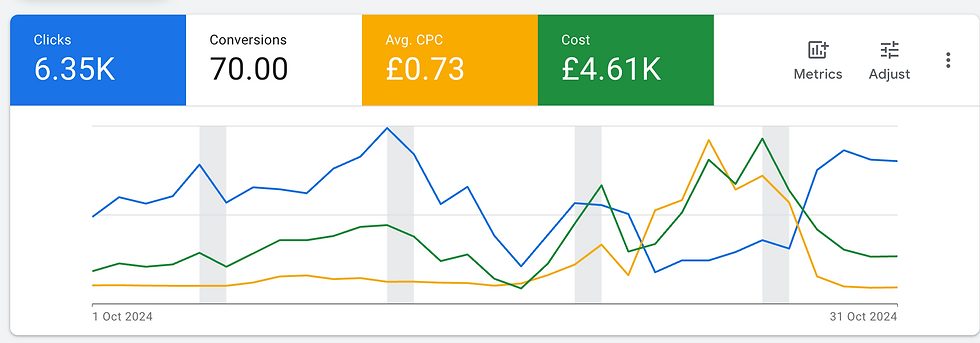
What this graph shows is the yellow line - CPC's - jumped from under £0.50 to a peak of £4 during that week.
Daily spend jumped from about £100 per day to as high as £375.
Meanwhile clicks dropped from about 250 per day to around 100 per day.
That would be ok if it generated more meaningful conversions, but in this case the conversion actions weren't set up properly, and even if they were, the change didn't have any positive impact on them so they reverted back.
An annoying mistake for the client and me. Since then I've always included this as something to watch out for (opt out of) in Google Ads/audit checklists since then.
How to opt out of Google Ads auto-apply
As I said, earlier, it's not the easiest or most logical path to opt out of this.
Navigate to 'Recommendations' on the left hand side of Google Ads and you'll see this screen...
See 'Auto-apply' there in the right hand side?

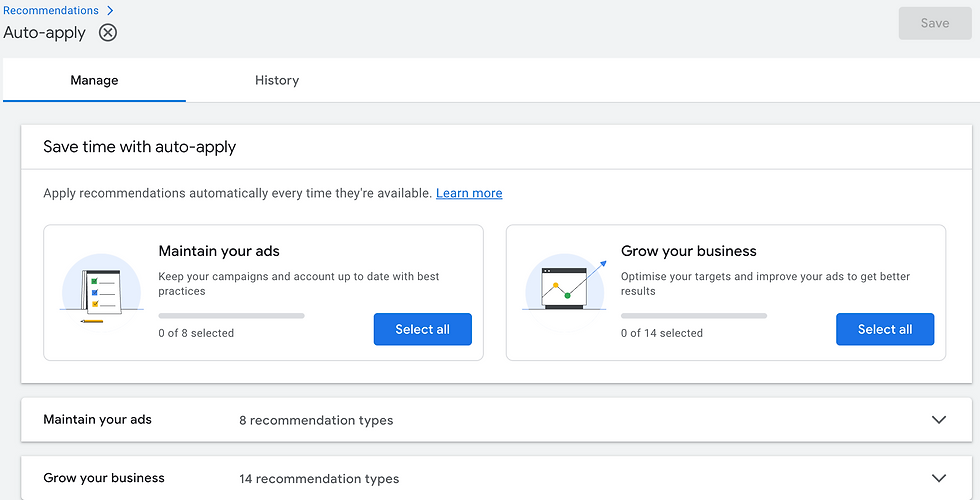
Once you've clicked on that, you'll see a screen like this....
If you have none selected as in this screenshot, all is good - you're not opted in to 'auto-apply'.
If you have any selected, it means you are opted in and you should be able to click on the buttons to 'de-select'.
Should I switch on Google Ads auto-apply?
I've covered a couple of things that could go wrong by switching it on.
And honestly, I can't see any benefit of switching it on.

Google is always trying to grow it's profits. While it makes all the right noises about helping advertisers and trying to make it easier for them, does this feature know enough about you and your business strategy to work effectively?
If you're opted in, it can also do things like:
add in advert headlines/descriptions - how on earth would it know whether these are 'on brand' or compliant in your industry?!
adjust your CPA and/or ROAS targets if you're using these bidding strategies - these could be expensive changes
I recommend you:
check that you're not opted in to this (and if you are, opt out)
learn the basics of managing and optimising Google Ads rather than letting Google do it for you....
Of course if you're stuck and/or don't know where to start, I'm here to help.
I've helped many businesses improve their PPC (Google Ads) performance from PPC audits to digital marketing power hours and PPC coaching which has sometimes meant switching it off! It isn't for everyone, and it's an easy way to waste money if things aren't set up right....
More on that on these posts which you might enjoy if you're enjoyed this one :)


Comments